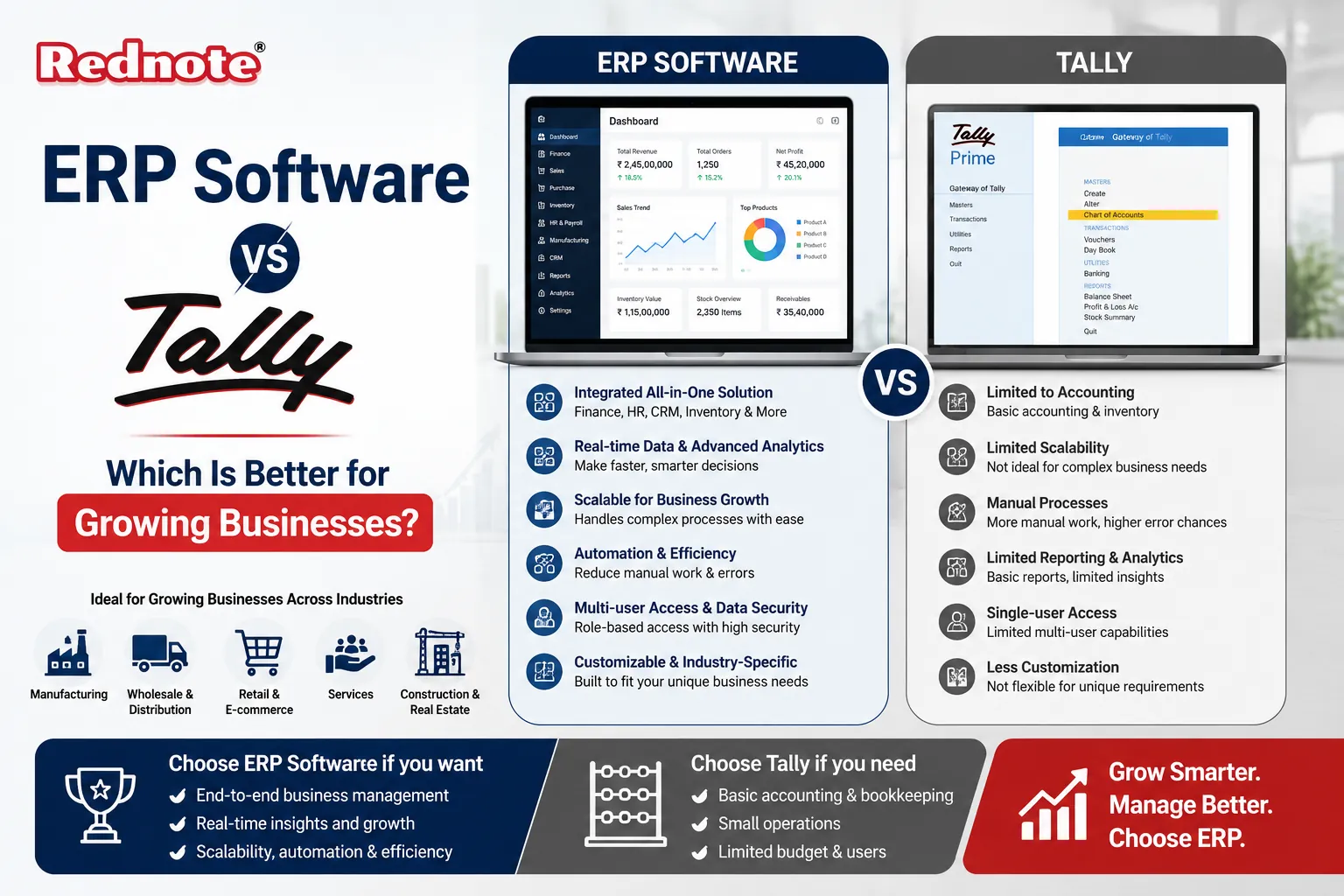
ERP Software vs Tally: Which Is Better for Growing Businesses?
If your business has outgrown spreadsheets and your accounting software feels like it's holding you back, you've probably landed on the same question thousands of founders and finance heads ask every year: ERP Software vs Tally which one actually makes sense for where your business is headed?
Tally has been the go-to choose for small and mid-sized Indian businesses for decades. It's simple, affordable, and everyone in the accounting department already knows how to use it. But as operations expand more locations, more inventory, more departments talking to each other many businesses hit a wall with what Tally was originally built to do.
In this guide, we'll break down what each system actually offers, where Tally still holds its ground, where it starts to struggle, and how to decide which one fits your business today and three years from now. By the end, you'll have a clear framework for making this decision instead of just going with whatever your accountant is used to.
What Is Tally and What Is ERP Software?
Before comparing the two, it helps to understand what each one was actually designed to do.
What Is Tally?
Tally is accounting software built primarily for bookkeeping, GST compliance, invoicing, and basic inventory tracking. It was designed for businesses that need reliable, straightforward financial record-keeping without a steep learning curve. Most small retailers, traders, and service businesses in India rely on it for exactly this reason it does the accounting job well and doesn't ask for much in return.
What Is ERP Software?
ERP (Enterprise Resource Planning) software is a broader system that connects finance, inventory, procurement, sales, HR, production, and sometimes customer service into a single platform. Instead of separate tools that don't talk to each other, an ERP gives every department a shared, real-time view of the business. It's less about recording transactions and more about running the entire operation from one place.
Quick answer: Tally is accounting-first software; ERP is operations-first software that includes accounting as one module among many.
Key Differences Between Tally and ERP Systems
This is really a conversation about ERP vs Accounting Software, and the gap becomes obvious once you line up the core capabilities side by side.
| Feature | Tally | ERP Software |
|---|---|---|
| Core Focus | Accounting & GST Compliance | End-to-End Business Operations |
| Inventory Management | Basic Stock Tracking | Multi-Warehouse, Batch, and Supply Chain Tracking |
| Departments Covered | Finance | Finance, Sales, HR, Production, Procurement |
| Multi-Location Support | Limited | Built for Multi-Branch, Multi-Currency Operations |
| Automation | Manual Entry-Heavy | Workflow Automation Across Departments |
| Reporting | Standard Financial Reports | Real-Time Dashboards Across the Business |
| Customization | Limited Scripting (TDL) | Highly Configurable Modules and Workflows |
| Learning Curve | Low | Moderate to High, Depending on the System |
| Cost | Low Upfront Cost | Higher Upfront, Scales with Usage |
This pattern here is simple: Tally does one thing efficiently. ERP does many things in a connected way. Neither is "wrong" it depends entirely on how complex your operations have become.
Where Tally Still Wins
It's worth being honest here Tally isn't outdated, and for a specific type of business, it's still the smarter choice.
Simplicity: New staff can be trained on Tally in a day or two.
Cost: Licensing is far cheaper than most ERP platforms, which matters a lot for lean teams.
GST and compliance: Tally's compliance tools are well-tested and widely trusted by auditors and accountants across India.
Single-location businesses: If you run one shop, one office, or one warehouse with straightforward accounting needs, Tally covers the essentials without extra complexity.
If your business fits this description and isn't planning major expansion soon, switching to an ERP right now would likely be overkill.
Why Businesses Outgrow Tally
Growth tends to expose the same set of problems in Tally, and they show up in a fairly predictable order.
Disconnected departments. Sales, inventory, and finance start living in separate spreadsheets that someone has to manually reconcile every month.
Multi-branch chaos. Managing stock and accounts across multiple locations becomes a manual, error-prone process.
No real-time visibility. Leadership can't see live numbers across departments — everything is a report generated after the fact.
Manual reconciliation. Teams spend hours matching purchase orders, invoices, and stock movements by hand.
Limited scalability. Adding new business units or processes often means bolting on more manual work rather than automating it.
This is usually the point where business owners start actively searching for a Tally Alternative not because Tally is bad software, but because their operations have simply outgrown what accounting software alone can manage. At this stage, the conversation shifts from bookkeeping tools to true ERP Software for Growing Businesses that can scale alongside revenue, headcount, and locations.
Choosing the Right Fit: Small Business vs Growing Business
The right answer isn't universal it depends on your stage of growth.
Quick answer: Choose Tally if you're a single-location business focused mainly on accounting and compliance. Choose ERP if you manage multiple departments, locations, or complex inventory that need to work together in real time.
If You're a Small, Single-Location Business
Look for the Best ERP Software for Small Business only if you're already feeling friction with manual processes otherwise, Tally remains a cost-effective, reliable choice. Many small businesses run comfortably on Tally for years before any ERP conversation becomes necessary.
If You're Scaling Fast
Once you're managing multiple branches, a growing product catalog, production planning, or a larger team across departments, an ERP system starts paying for itself in time saved and errors avoided. The upfront cost is higher, but so is the operational clarity you get in return.
A simple gut-check: if your finance team spends more time reconciling data between tools than analyzing it, that's a strong signal you've outgrown accounting-only software.
Common Mistakes When Comparing Tally and ERP
Comparing on price alone. A cheaper tool that creates manual work every month often costs more in labor hours than a pricier, automated system.
Choosing ERP too early. Implementing a full ERP for a business that's still small and simple can slow things down instead of helping.
Ignoring implementation time. ERP rollouts take weeks or months, not days plan accordingly and don't wait until you're in a crisis.
Skipping staff training. The best system in the world fails if your team doesn't know how to use it properly.
Assuming "ERP" means one thing. ERP platforms vary hugely in complexity and cost — some are built specifically for small businesses, others for large enterprises. Match the platform to your actual size, not your ambitions.
Making the Switch: What to Expect
If you do decide to move from Tally to an ERP system, here's a realistic idea of what the process looks like:
Data migration. Exporting historical financial and inventory data from Tally into the new system.
Process mapping. Documenting how each department currently works before automating it.
Configuration. Setting up modules for finance, inventory, HR, or production based on your needs.
Parallel running. Operating both systems briefly to confirm accuracy before fully switching over.
Staff training. Hands-on sessions so teams are confident using the new workflows from day one.
Most mid-sized businesses complete this transition in 6 to 12 weeks, depending on how many modules and locations are involved.
Conclusion
There's no single winner in the ERP Software vs Tally debate it comes down to where your business actually stands today. Tally remains a dependable, low-cost choice for straightforward accounting and single-location operations. ERP systems earn their higher price tag once your business needs departments to work together in real time, across multiple locations or complex inventory chains.
The smartest move isn't picking the "better" software in general it's picking the one that matches your current operations without over-investing or under-preparing for growth. If you're unsure which stage you're at, start by mapping out where your team currently loses the most time to manual work. That's usually where the real answer lives.
Not sure which system fits your business? Talk to a business systems consultant who can assess your current workflows and recommend the right fit before you commit to either platform.
Frequently Asked Questions