



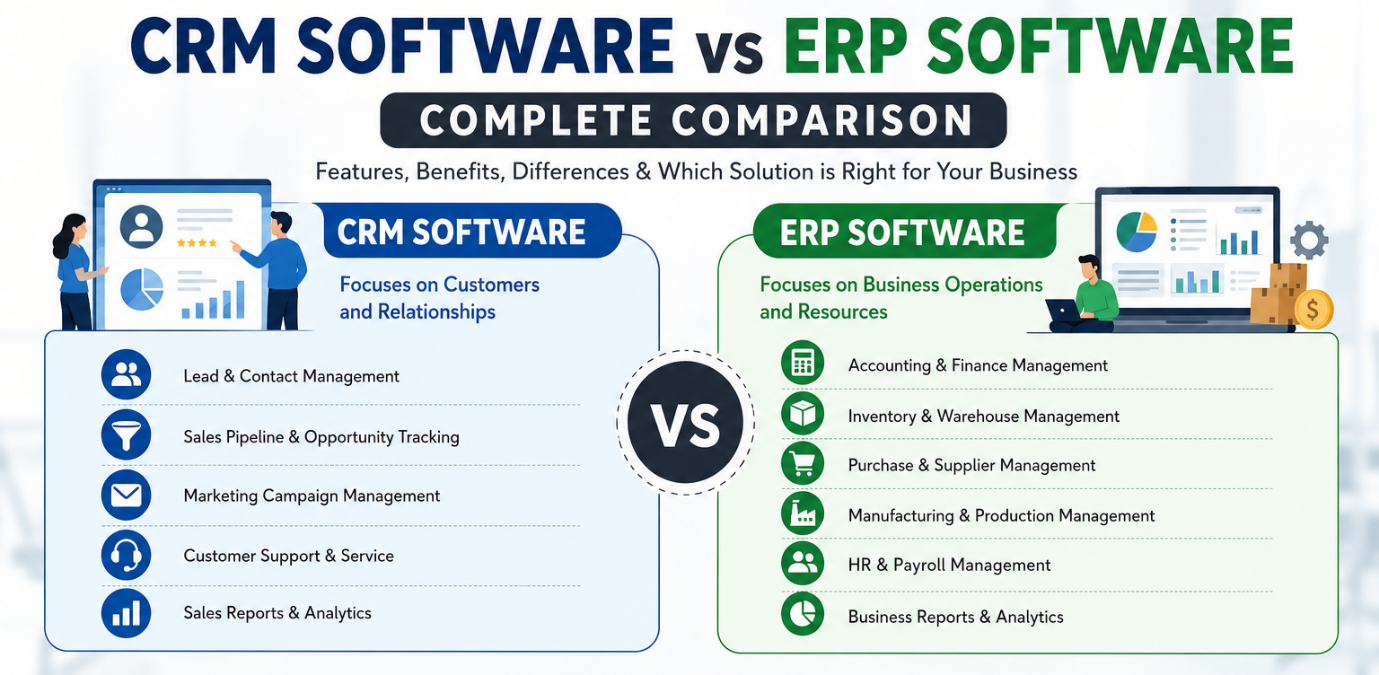
CRM Software vs ERP Software: Complete Comparison
Managing a growing business in today's fast-paced market requires clear visibility, seamless automation, and streamlined workflows. As organizations scale, relying on spreadsheets and manual entry quickly becomes a bottleneck. To solve this, two essential software categories dominate modern business operations: CRM Software and ERP Software.
While both system types drive productivity and operational excellence, they serve fundamentally different business functions. A CRM focuses on driving revenue through front-office tasks like sales and customer service, whereas an ERP focuses on reducing operational costs through back-office management like inventory, accounting, and supply chain logistics.
Understanding the difference between CRM and ERP software is critical to investing your budget wisely. In this complete comparison guide, Rednote breaks down their core features, key differences, hidden costs, and how to choose the right system for your business.
What is CRM Software?
CRM software is designed to manage and optimize how a business interacts with its current and potential customers. It acts as a central repository for all customer data, sales funnels, marketing activities, and support interactions.
The primary objective of CRM software is simple: Increase revenue and boost sales.
CRM Software Focus
- Lead Capture & Tracking
- Sales Pipeline Management
- Customer Support Ticketing
- Marketing Automation
Core Features of CRM Software
- Lead and Pipeline Management: Track prospective customers from initial enquiry to closed deal. Visualize stages, set reminders, and prevent leads from slipping through the cracks.
- Sales Force Automation: Automate routine tasks like follow-up emails, quote generation, and task assignments to let sales teams focus on closing deals.
- Contact and Account Management: Store detailed customer histories, communication preferences, order histories, and past support tickets in one easily searchable place.
- Marketing Automation: Run targeted email campaigns, segment audiences based on behavior, and measure ROI across marketing channels.
- Customer Support and Ticketing: Manage customer queries, service requests, and feedback systematically to maintain high customer satisfaction levels.
What is ERP Software?
ERP (Enterprise Resource Planning) software is an integrated system designed to manage all internal business processes across various departments. It connects front-office information with back-office operations to ensure real-time visibility across the entire enterprise.
The primary objective of ERP software is simple: Reduce operational costs and improve process efficiency.
ERP Software Focus
- Financials & General Ledger
- Inventory & Warehouse Control
- Supply Chain & Procurement
- HR & Payroll Management
Core Features of ERP Software
- Financial Management and Accounting: Centralize general ledgers, accounts payable/receivable, budgeting, and tax compliance automation.
- Inventory and Supply Chain Management: Monitor stock levels in real time, automate reorder points, track raw materials, and manage supplier relationships.
- Human Resources (HRM) and Payroll: Manage employee records, time tracking, performance reviews, salary disbursals, and compliance effortlessly.
- Manufacturing and Production Planning: Schedule shop-floor operations, track bill of materials (BOM), and monitor equipment yield to reduce downtime.
- Order Management and Logistics: Streamline order processing from purchase to fulfillment, delivery, and billing without manual intervention.
CRM Software vs ERP Software: Detailed Head-to-Head Comparison
To help you distinguish between the two, here is an executive-level summary comparing the fundamental characteristics of CRM and ERP systems:
| Feature / Aspect | CRM Software | ERP Software |
|---|---|---|
| Primary Focus | Front-Office Operations (Sales, Support) | Back-Office Operations (Finance, Supply Chain) |
| Core Purpose | Maximize Revenue & Sales | Minimize Costs & Streamline Processes |
| Primary Users | Sales, Marketing, Customer Service | Finance, Operations, HR, Supply Chain, Logistics |
| Key Metric | Customer Lifetime Value (CLV), Conversion Rate | Return on Assets (ROA), Operational Cost Savings |
| Data Managed | Leads, Prospects, Contact Profiles, Tickets | Accounting, Inventory, Purchase Orders, Payroll |
| Implementation Scope | Faster deployment, lower complexity | Broader scope, higher technical complexity |
| Impact on Business | Drives Top-Line Growth | Drives Bottom-Line Efficiency |
Key Differences Explained
1. Front-Office vs. Back-Office Operations
The clearest distinction lies in who uses the software daily. CRM Software operates on the front lines. Sales representatives, customer success teams, and marketers rely on CRM to communicate with external prospects and customers.
ERP Software, on the other hand, runs the internal backbone of the company. Accountants, warehouse staff, human resource personnel, and procurement managers use ERP to ensure goods are manufactured, accounts are balanced, and orders are fulfilled smoothly.
2. Top-Line Growth vs. Bottom-Line Efficiency
- CRM drives top-line revenue:
- ERP drives bottom-line profitability:
By improving customer acquisition, shortening sales cycles, and improving retention, a CRM increases the overall money coming into your business.
By eliminating manual data re-entry, optimizing inventory carrying costs, and reducing operational friction, an ERP maximizes the profit kept from every dollar earned.
3. Implementation Time and Complexity
- CRM implementations are typically lighter and faster. Cloud-based CRM solutions can often be configured and rolled out within a few weeks, requiring minimal process redesign.
- ERP implementations touch virtually every corner of an organization. Migrating financial records, mapping custom production workflows, and integrating legacy databases mean ERP deployments can take several months.
When Does Your Business Need a CRM?
You should prioritize implementing or upgrading your CRM software if your business experiences any of the following pain points:
- Inconsistent Lead Follow-Up: Sales reps store prospective leads on personal spreadsheets or notebooks, leading to lost sales opportunities.
- Low Lead Conversion Rates: Your team struggles to track where leads sit within the sales pipeline.
- Siloed Customer Data: Customer service agents cannot access past purchasing histories to resolve support inquiries quickly.
- Unpredictable Revenue Forecasting:Executives lack visibility into potential incoming revenue and pipeline deal stages.
When Does Your Business Need an ERP?
Investing in an enterprise-grade ERP system becomes essential when your operational friction starts holding back growth:
- Stockouts and Inventory Discrepancies: You frequently experience inventory mismatches, delayed order fulfillment, or excess stock carrying costs.
- Financial Reporting Delays: Closing financial books at the end of the month takes weeks due to fragmented accounting spreadsheets.
- Manual Data Entry Between Departments: Orders taken by sales teams must be manually typed into accounting and warehouse systems.
- Lack of Process Standardization: Different branches or manufacturing locations operate on inconsistent workflows.
Can CRM and ERP Software Work Together?
Yes—and for growing enterprises, they must.
Viewing CRM and ERP as rivals is a misconception. In modern business architectures, they complement each other. When you integrate a CRM with an ERP, you create a seamless unified data flow across the business:
- Order Creation: A sales rep closes a deal in the CRM.
- Fulfillment & Invoicing: The integrated ERP automatically receives the closed deal, checks warehouse stock, generates a work order, produces an invoice, and alerts shipping.
- Customer Visibility: The sales rep can see real-time order status and invoice delivery inside the CRM without bothering warehouse staff.
By integrating both platforms, organizations eliminate double data entry, eliminate operational blind spots, and deliver superior customer experiences. At Rednote, we specialize in delivering tailored software solutions designed to unify your front-office sales and back-office management smoothly.
How to Choose: Which One Should You Buy First?
If your business budget allows for only one software system right now, ask yourself these diagnostic questions:
- Is your primary hurdle getting more sales? If your internal operations can comfortably handle more orders, but you lack leads or structured sales pipelines, invest in CRM Software first.
- Is your primary hurdle fulfilling existing demand efficiently? If your sales team is bringing in orders, but you suffer from inventory errors, late shipments, and slow financial reporting, prioritize ERP Software.
Both CRM and ERP software serve as powerful catalysts for business transformation. CRM Software empowers your business to capture, nurture, and retain customers, driving top-line growth. ERP Software standardizes internal processes, manages resources, and optimizes costs, strengthening bottom-line performance.
Whether you need a dedicated CRM system, an all-encompassing ERP platform, or a unified approach connecting both, selecting the right software partner is crucial. Discover how custom software solutions from Rednote can transform your business workflows today!

