



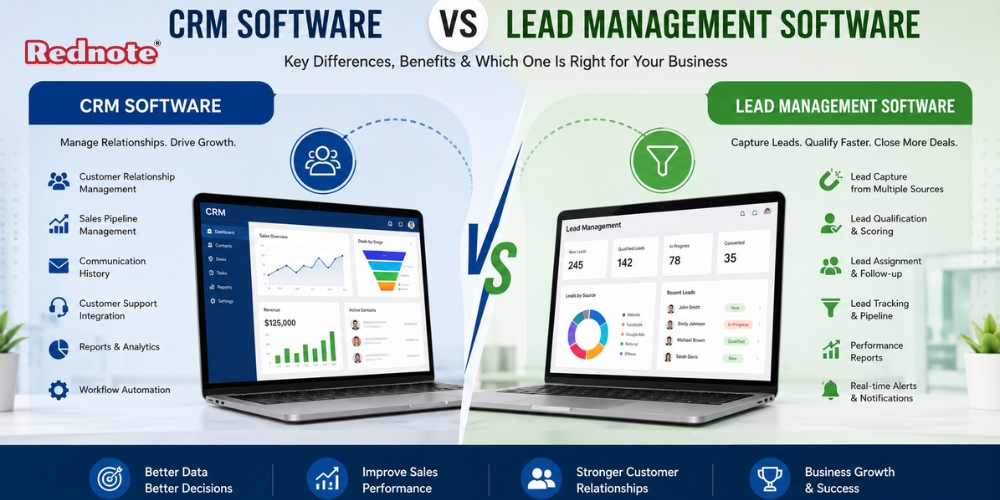
CRM Software vs Lead Management Software
Businesses often use the terms customer relationship management and lead management interchangeably, but they are not exactly the same. Both CRM Software is help sales teams organize prospects, track interactions, and improve the sales process. However, their main goals, features, and ideal use cases can be quite different.
Generally designed to manage broader customer relationships, while lead management software focuses more specifically on capturing, qualifying, tracking, and converting potential customers. Understanding this difference is important before investing in a sales technology platform.
Choosing the wrong system can create unnecessary costs, complicated workflows, and poor adoption among sales teams. The right choice depends on your business size, sales cycle, number of leads, customer relationship requirements, and future growth plans.
What Is CRM Software?
A customer relationship management platform is built to manage interactions with prospects and existing customers throughout their relationship with a business.
It typically stores customer information, communication history, sales activities, deals, follow-ups, support information, and other relationship-related data in one central system.
Common capabilities include:
- Contact and customer management
- Sales pipeline tracking
- Email and communication history
- Task and reminder management
- Sales reporting
- Customer service integration
- Marketing automation
- Workflow automation
- Revenue forecasting
- Team collaboration
The major advantage is CRM Software that sales and customer-facing teams can access a complete view of a customer's journey rather than relying on spreadsheets, emails, or separate applications.
What Is Lead Management Software?
Lead management software has a narrower focus. It is primarily designed to help businesses manage potential customers from the moment a lead enters the system until the lead is qualified, contacted, converted, or rejected.
Lead management usually covers the following stages:
- Lead capture
- Lead organization
- Lead qualification
- Lead scoring
- Lead assignment
- Follow-up
- Conversion
- Performance tracking
For businesses receiving leads from websites, landing pages, advertisements, social media, forms, or other channels, this type of system can make the initial sales process easier to control.
Instead of allowing leads to sit in an inbox or spreadsheet, sales teams can assign ownership, set follow-up reminders, monitor lead status, and identify prospects that require immediate attention.
CRM vs Lead Management: Key Differences
Although the two solutions overlap, their primary objectives are different.
| Feature | CRM Software | Lead Management Software |
|---|---|---|
| Main purpose | Manage complete customer relationships | Manage and convert prospects |
| Primary users | Sales, marketing, support, management | Sales and lead-generation teams |
| Contact management | Advanced | Usually focused on prospects |
| Lead capture | Usually available | Core feature |
| Lead scoring | Often available | Commonly a central feature |
| Customer history | Extensive | Limited or conversion-focused |
| Sales pipeline | Advanced | Usually simpler |
| Customer support | Often integrated | Generally limited |
| Marketing integration | Strong | Depends on platform |
| Reporting | Broad business reporting | Lead and conversion reporting |
| Complexity | Moderate to advanced | Usually simpler |
| Best for | Growing businesses with ongoing customer relationships | Businesses focused heavily on lead conversion |
The difference becomes clearer when looking at the complete customer journey. Lead management mainly concentrates on moving a prospect toward a sales opportunity. A CRM platform usually continues beyond that stage and helps manage the relationship after the sale.
Key Benefits of CRM Platforms
A broader customer management platform can provide several advantages for businesses with complex sales and customer relationships.
1. Centralized Customer Data
Customer details, interactions, notes, deals, and communication records can be stored in one place. This reduces the need to search through multiple tools.
2. Better Sales Pipeline Visibility
Managers can see which opportunities are new, active, delayed, won, or lost. This makes it easier to identify sales bottlenecks.
3. Improved Team Collaboration
When information is shared across departments, employees can understand customer history without repeatedly asking other team members for information.
4. Automation
Routine tasks such as assigning leads, sending reminders, updating records, and triggering notifications can be automated.
5. Customer Retention
Because customer information remains available after conversion, teams can continue follow-ups, identify upselling opportunities, and provide more consistent service.
Key Benefits of Lead Management Systems
Lead-focused platforms can be particularly useful when the main business challenge is handling a large volume of incoming prospects.
Faster Lead Response
Automated assignment and notifications can help sales representatives respond to new inquiries quickly.
Better Lead Qualification
Sales teams can classify leads based on factors such as interest, budget, company size, location, source, or engagement.
Reduced Lead Leakage
A structured process makes it harder for inquiries to disappear without follow-up.
Improved Conversion Tracking
Businesses can identify which sources produce qualified leads and which channels generate poor-quality inquiries.
Simpler Sales Workflows
Small sales teams may prefer a focused platform instead of implementing a complex system with features they do not currently need.
Which One Should Your Business Choose?
There is no universal winner. The better option depends on what your sales team actually needs.
If your business primarily needs to capture leads, qualify prospects, assign inquiries, and track follow-ups, a lead management platform may be sufficient.
If your business needs to manage prospects as well as long-term customers, sales opportunities, support interactions, reporting, and marketing activities, CRM Software is generally the more suitable choice.
A company with a short sales cycle and straightforward lead-to-sale process may not need a highly sophisticated platform. On the other hand, businesses with multiple sales stages, recurring customers, account managers, and complex customer interactions can benefit from a broader system.
When Should You Upgrade to a CRM Platform?
Many businesses start with spreadsheets or simple lead tracking tools. That is not necessarily a problem in the early stages.
The problem begins when the volume of data becomes difficult to control.
Consider upgrading when:
- Leads are being missed or forgotten.
- Sales representatives maintain separate spreadsheets.
- Managers cannot easily track pipeline performance.
- Customer information is scattered across different applications.
- Follow-ups depend heavily on manual reminders.
- Multiple departments need access to customer history.
- Sales reporting takes too much manual effort.
- The business needs automated workflows.
At that point, continuing with disconnected tools can cost more in lost opportunities and employee time than investing in a centralized platform.
Cost Considerations
Price should not be the only deciding factor. A cheaper system can become expensive if it creates additional manual work or cannot support business growth.
When comparing platforms, consider:
- Monthly or annual subscription fees
- Number of users
- Contact or lead limits
- Automation features
- Integration costs
- Setup and implementation expenses
- Training requirements
- Data migration costs
- Customer support
- Future scalability
A small company may benefit from starting with a simple lead-focused platform. A growing organization should consider whether the system can support additional users, customers, integrations, and sales processes in the future.
Pro Tip
Pro Tip: Do not choose software based only on the number of features listed on the pricing page. Map your current sales process first. Identify where leads enter, who qualifies them, how follow-ups happen, when a lead becomes an opportunity, and what happens after a sale. Then choose the platform that supports that workflow with the least unnecessary complexity.
Common Mistakes When Choosing Sales Software
One of the biggest mistakes is buying a platform because it has an impressive feature list. More features do not automatically mean better results.
Another common mistake is ignoring user adoption. If sales representatives find the system complicated, they may continue using spreadsheets, personal notes, or email instead.
Businesses should also avoid choosing a platform without considering integrations. Lead forms, email systems, advertising platforms, accounting applications, customer support tools, and communication systems may need to exchange information.
Finally, businesses should think about scalability. A system that works for 500 leads may become inefficient when the company manages 50,000 leads and hundreds of customers.
Verdict
The difference between the two solutions comes down to scope.
Lead management software is primarily concerned with handling prospects efficiently and improving lead conversion. It is a focused Rednote option for businesses that need better control over incoming inquiries and sales follow-ups.
CRM Software takes a broader approach by connecting prospect management with customer relationships, sales activities, reporting, automation, and post-sale interactions.
Before making a decision, evaluate your current sales process rather than choosing based solely on popularity or price. If your primary challenge is lead organization and conversion, a focused solution may be enough. If you need a complete system for managing customer relationships throughout the sales lifecycle, a broader platform is likely the better long-term investment.

